How to Post a Casting Call on KidsCasting
Posting a casting call doesn’t have to be complicated. Whether you’re casting for a commercial, film, or modeling project, KidsCasting makes the process simple and fast.
Below is a step-by-step guide to help you get started.
Step 1: Log in and start a casting call
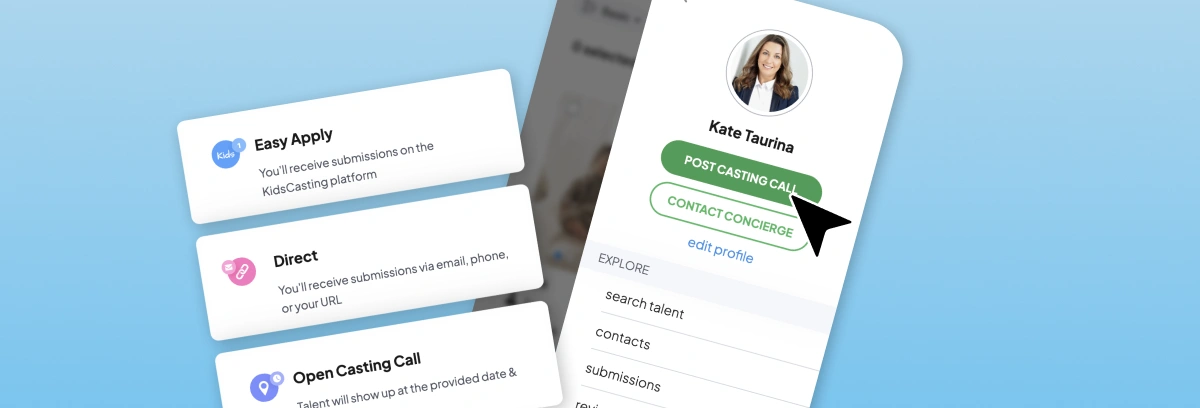
Log into your KidsCasting account and click “Post a Casting Call.”
Step 2: Choose how to receive submissions
You can select one of the following options:
- Platform submissions – receive applications directly through KidsCasting
- Direct submissions – via email, website, or phone
- Open casting call – for live or scheduled auditions
Step 3: Add casting details
Fill in the key information:
- Title (clear and specific)
- Category (acting, modeling, etc.)
- Location (local, nationwide, or worldwide)
- Zip code (if local)
- Short description
- Online audition option (optional)
- Expiration date
- Payment details (if applicable)
Step 4: Add roles
Click Continue, then define each role:
- Role title
- Description
- Gender
- Age range
- Ethnicity
Step 5: Review and publish
Double-check all details, then click Publish.
Once your casting call is approved, you’ll start receiving submissions from actors and models.
Why Use KidsCasting?
KidsCasting helps casting professionals connect with verified young talent quickly. With flexible submission options and a streamlined posting process, it’s designed to save time while reaching the right candidates.